
Stay on Track with Reminders
Let’s face it, we all have a lot going on in our day, so remembering to journal every day may not be at the top of our list. But if you want to make sure you stay on track with your JRNL’ing efforts, it is much easier when you take advantage of our Email Reminders. Users can set up a daily or every-other-day email reminder to help with personal accountability.
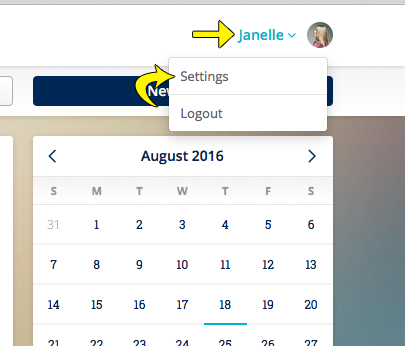
To enable your reminder settings, first login to the web application. To access settings, you can click here, or you can click on the dropdown arrow in the upper right hand corner of your screen, after logging in.
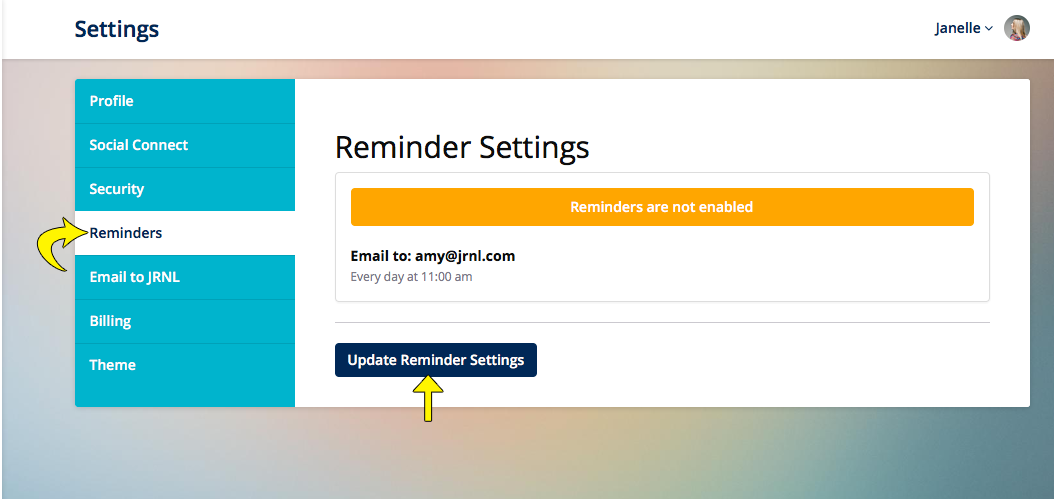
Once in Settings, you want to click on Reminders. Then you will click on Update Reminder Settings to enable reminders (or change your current settings).
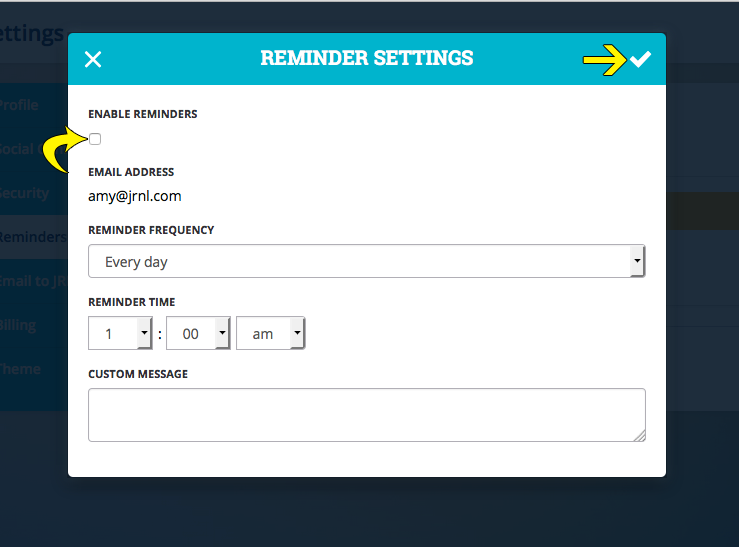
You can set the frequency of your reminder email to Every day or Every other day, as well as choose the time of the reminder and provide a custom message if desired. Once all settings are set as desired, make sure to toggle the “Enable Reminders” box and then press the checkmark to save your changes.
The day after setting up reminders you will receive your first reminder. The email will allow you to click on a link to open to our website, or you can simply reply to the email and an entry will be created in your default journal.
**Please note: To title your entry when replying to the reminder email, you will want to modify the subject line to the desired title of your entry.
To take advantage of this feature, and many other features to help you with your JRNL’ing habits, visit JRNL.com
4 Comments
This does not appear to be interested in Androids. Can’t use it.
We are actually currently working on our Android app, and hope to have it available soon. In the meantime, you can use the mobile web browser on your Android (Chrome, Firefox, etc) to access our site.
YAY!!! I can’t wait for the Android app! Until then, I love using this with my gmail through Chrome. Great work guys.
Any word on an Android app?